
Alright, folks, let’s talk smart homes. If you’re anything like me, you’ve probably dabbled a bit, maybe started with a smart bulb here, a voice assistant there. But then you hit a wall. You want more, you want things to *just work* together, seamlessly, reliably, and without breaking the bank. That’s exactly where I was, and that’s exactly when I stumbled upon Aqara. And let me tell you, it’s been a game-changer for my entire living space.
Before Aqara, my smart home setup felt more like a collection of disjointed gadgets than a cohesive system. I had devices from different brands, each with its own app, its own quirks, and its own connectivity issues. It was a constant struggle to get them to communicate, let alone create meaningful automations. I was looking for a unified ecosystem, something that spoke the same language, ideally one that played nice with Apple HomeKit since I’m pretty deep in that ecosystem, but also offered flexibility for others. After a fair bit of research, Aqara kept popping up. What initially caught my eye was their commitment to HomeKit, Matter, and other major platforms, along with their use of Zigbee 3.0, which promised rock-solid reliability and low power consumption. Plus, their price point seemed incredibly reasonable for the features offered. I decided to take the plunge, and I haven’t looked back since.
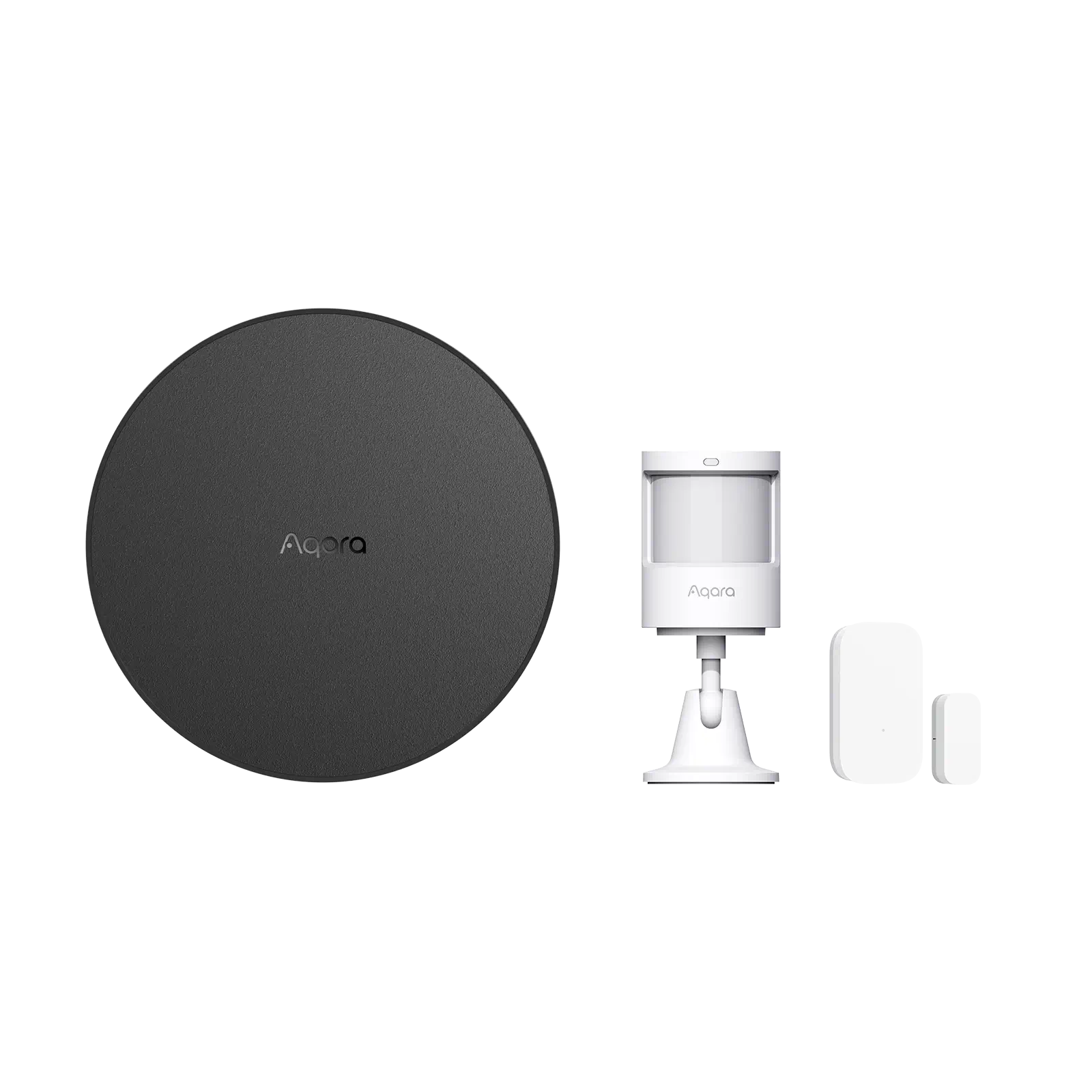
My Aqara journey began, as many do, with a hub. I opted for the Aqara M2 Hub, which connects all the Zigbee devices and acts as the brain of the operation, linking everything to my home network and subsequently to HomeKit, Alexa, and Google Assistant. Setting it up was surprisingly straightforward. Plug it in, open the Aqara Home app, follow a few simple prompts, and boom – I had a central point for all my future smart devices. The M2 hub itself is pretty discreet, and it even doubles as an IR remote controller, which was a bonus I hadn’t fully appreciated until I started using it to control an old mini-split AC unit that wasn’t “smart” at all. Suddenly, I could turn my AC on or off, or adjust the temperature, right from my phone or with a voice command. That alone was pretty mind-blowing for a device I thought was stuck in the past.
The World of Aqara Sensors: My Absolute Favorites
Where Aqara truly shines, in my experience, is with its sensors. This is where the real magic of home automation happens. I started with the basics and quickly expanded because they’re so versatile and affordable.
Door and Window Sensors
These tiny devices are probably the unsung heroes of my smart home. I initially got them for security – knowing if a door or window was open or closed. But I quickly discovered their potential for automation. For instance, I have a sensor on my front door. When the door opens *after* 10 PM, it triggers a gentle entryway light to come on, and it also sends a notification to my phone, just in case. During the day, if the door opens, and it’s particularly hot outside, it sends a reminder to ensure the AC is running efficiently. They are incredibly small, barely noticeable, and the battery life is phenomenal. I put one on my garage door too, and it’s given me so much peace of mind knowing its status from anywhere.
One of my buddies, who also uses Aqara, told me about his experience: “I put an Aqara Door and Window Sensor on my kids’ bedroom window. Now, if they try to sneak it open after bedtime, I get an alert! It’s been a lifesaver, and the battery lasts forever.” This resonates perfectly with my own use.
Motion Sensors
Next up were the Aqara Motion Sensors. These are also compact and fantastic for lighting automation. I have one in my hallway, so when I walk in, the lights automatically turn on. After a set period of no motion, they turn off. No more fumbling for light switches, no more leaving lights on unnecessarily. I even put one in my pantry, and now getting a snack is a much more elegant affair with automatic lighting. They’re quick to react, and their detection range is surprisingly good for such a small device. They also have a built-in light sensor, which I use to fine-tune automations – only turning lights on if it’s dark enough.
Temperature and Humidity Sensor
Living in an area with fluctuating weather, keeping an eye on indoor climate is important. I’ve placed Aqara Temperature and Humidity Sensors in several rooms, and particularly in the basement. Not only do I get accurate readings in the Aqara app (and HomeKit), but I’ve set up alerts for when the humidity levels get too high in the basement, prompting me to turn on the dehumidifier. This has been invaluable in preventing potential mold issues and keeping my home comfortable. It’s a passive device that provides active peace of mind.
Water Leak Sensor
This one is pure protection. I have an Aqara Water Leak Sensor under my kitchen sink and near my water heater in the utility room. It’s a small puck that sits unobtrusively on the floor. The idea is simple: if it detects water, it sends an immediate alert to my phone. Thankfully, I haven’t had a major leak since installing them, but knowing they’re there, silently standing guard, is a huge relief. It’s the kind of device you hope you never need, but are incredibly grateful to have if you do.
Beyond Sensors: Practical Smart Devices
While the sensors got me hooked, Aqara’s range extends far beyond, covering almost every aspect of home automation.
Smart Plugs and Wall Switches
I’ve swapped out several regular wall outlets and switches for Aqara Smart Plugs and Wall Switches. The Smart Plugs are fantastic for lamps, humidifiers, or even my coffee maker. I can schedule them to turn on or off, or control them with voice commands. The Wall Switches (I use the wired ones that replace existing light switches) were a revelation. Now, my ceiling lights are smart, even with old dumb bulbs, and I can automate them based on motion, time of day, or simply control them via the app or voice. Installation was straightforward for someone with basic electrical knowledge, and they look clean and modern.
My sister was initially hesitant about smart home tech, but after seeing my setup, she got some Aqara Smart Plugs. She told me, “I finally feel like my house is catching up to the 21st century! I love being able to turn off the kids’ bedroom lights from my phone after they’ve fallen asleep, without having to tiptoe in.” It’s these little conveniences that really make a difference.
Curtain Driver E1
This is one of those devices that feels like a luxury but quickly becomes indispensable. I installed an Aqara Curtain Driver E1 on my bedroom curtains. Now, my curtains open automatically at sunrise (or a set time) to gently wake me up, and close automatically at sunset for privacy. It’s incredibly satisfying to wake up to natural light without having to get out of bed to pull the curtains open. It’s battery-powered and mounts easily to existing curtain rods. The quiet operation is a big plus too; it doesn’t disturb anyone.
Camera Hub G3
I use the Aqara Camera Hub G3 in my living room. It’s not just a camera; it’s another hub for Zigbee devices, and it has some really cool features. The pan and tilt functionality allows me to view different angles of the room, and the AI human and pet recognition is surprisingly good. It can even follow a person or pet as they move around. I primarily use it to keep an eye on my dog when I’m out. The local storage option (via microSD card) is a huge win for privacy, as I prefer to keep my recordings off the cloud where possible. It also works as an IR remote controller, much like the M2, adding even more control over my existing “dumb” electronics. The two-way audio is also handy for barking at my dog to get off the couch (kidding, mostly!).
The Aqara Ecosystem: Seamless Integration and Reliability
What really ties all these devices together and elevates Aqara above many competitors is the strength of its ecosystem.
App and Automation
The Aqara Home app is well-designed and intuitive. Adding new devices is a breeze, and creating automations is where the fun truly begins. The “If This Then That” logic is easy to understand, allowing for complex scenarios. For example: “If motion is detected in the living room AND it’s after 7 PM AND the light sensor on the motion detector shows it’s dark, THEN turn on the living room lamps to 50% brightness.” You can chain multiple conditions and actions, creating a truly smart environment tailored to your habits. The ability to create ‘scenes’ – like a ‘Good Morning’ scene that opens curtains, turns on lights, and starts the coffee maker – adds another layer of convenience.
Connectivity and Stability
The Zigbee 3.0 protocol that Aqara uses is incredibly stable. Unlike Wi-Fi devices that can sometimes hog bandwidth or drop connections, Zigbee creates a mesh network. Each powered Aqara device (like a smart plug or a wall switch) acts as a repeater, extending the network’s range and making it more robust. This means even if a device is far from the hub, it can still connect through another Aqara device closer to it. In my experience, devices respond almost instantly, with virtually no lag. This reliability is paramount for a smart home – you want your lights to turn on *when* you enter a room, not seconds later.
Another user, ‘TechSavvyMom’, shared her thoughts on the stability: “After struggling with Wi-Fi smart plugs constantly dropping offline, I switched to Aqara and their hub. The difference is night and day. Everything just works, all the time. It’s so reliable, which is crucial when you depend on it for security and daily routines.” I couldn’t agree more with this sentiment.
Multi-Platform Compatibility
One of the biggest selling points for me was Aqara’s commitment to multi-platform compatibility. Everything integrates beautifully with Apple HomeKit, which is my primary interface. But it also works seamlessly with Amazon Alexa and Google Assistant. This means I can control my devices with voice commands through any of my smart speakers. Their move towards Matter compatibility also future-proofs the system, ensuring it will continue to work with upcoming smart home standards, which is a big relief for long-term investment.
My Everyday Life with Aqara
Let me give you a glimpse into a typical day with my Aqara setup.
My morning starts before my alarm. My bedroom curtains, driven by the Aqara Curtain Driver E1, slowly open to let in the natural light. A few minutes later, the bedside lamp connected to an Aqara Smart Plug gently brightens. As I get out of bed, the Aqara Motion Sensor detects my presence, and the hallway lights turn on softly, just enough to navigate without blinding me. In the kitchen, an Aqara Smart Plug ensures my coffee maker starts brewing at 6:30 AM, so it’s ready by the time I walk in.
Throughout the day, if I leave a window open for too long (especially if the AC is on), my Aqara Door and Window Sensor alerts me, reminding me to close it. If I head out, a simple voice command or a tap in the app sets my ‘Away’ scene, which turns off all lights, closes the curtains, and arms my security sensors. The Aqara Camera Hub G3 keeps an eye on things, notifying me of any unusual activity or just letting me peek at my dog napping.
In the evening, as it gets dark, the Aqara light sensors trigger specific lights to come on automatically, creating a cozy ambiance. When I settle down to watch TV, my Aqara M2 Hub (using its IR blaster) turns on my TV and soundbar to the right settings. Finally, when it’s bedtime, a ‘Good Night’ scene turns off all lights, sets the thermostat, and makes sure all doors and windows are closed.
It’s not just about convenience; it’s about energy efficiency, security, and truly tailoring my home to *my* life. The automations often run so smoothly that I don’t even think about them; they just *happen*. And that’s the sign of a truly smart home.
Value for Money and Final Thoughts
One of the most impressive aspects of Aqara is its incredible value for money. Compared to many other brands in the smart home space, especially those offering HomeKit compatibility, Aqara devices are significantly more affordable without compromising on quality, reliability, or features. This makes building out a comprehensive smart home system much more accessible. You can start with a hub and a few sensors and gradually expand your setup without feeling like you’re constantly draining your wallet.
Are there any downsides? Very few, in my experience. The initial setup of the hub and a few devices requires a stable internet connection, like any smart home device. Sometimes the advanced automations can take a bit of thought to set up perfectly, but the app is generally very user-friendly. The main thing is understanding that you generally need a hub to get started, but once you have that, adding more devices is super simple.
I’ve had such a positive journey with Aqara that I often recommend it to friends and family looking to dive into the smart home world or upgrade their existing setup. It’s mature, reliable, feature-rich, and doesn’t break the bank. It brings a level of sophistication and automation to everyday living that genuinely enhances quality of life. It’s truly transformed my home into a responsive, intuitive space that anticipates my needs.
If you’re ready to experience a smart home that genuinely works for you, I highly recommend exploring what Aqara has to offer. Whether you’re a beginner or a seasoned smart home enthusiast, their ecosystem provides a robust and flexible foundation for creating the intelligent home you’ve always wanted. Take it from someone who lives with it every single day – it’s a decision you won’t regret.
Why not take a look for yourself and see how Aqara can transform your living space? It’s been an incredible upgrade for me.